Written by Ken Marshall
 Audited by Admin
🔍 101+ Products Analyzed
★ 16k Reviews Evaluated

Owning a Segway Ninebot is about more than just moving from one point to another.
Whether you're a seasoned rider or a new owner, there may be a time when you need toÃÂ unbind your Segway Ninebot.
You can do this unbinding process both by using the Segway App and without the app. I will be covering both these methods in this guide, offering step-by-step instructions to help you navigate unbinding effortlessly.
Whether it's an ESX model or the Ninebot Max, consider this guide your road map to a seamless unbinding journey.
PS - If you're considering a replacement for your Segway Ninebot, you can't go wrong with my favorite electric scooter of all time:
| Product Image | Product | Latest Price |
| Gotrax GXL V2 |

Understanding Unbinding
Unbinding might sound like tech jargon, but it's actually a straightforward process. When you unbind your Segway Ninebot, you're actually disconnecting it from the Segway Ninebot App. This step is crucial when you're transferring ownership, personalizing your ride, or preparing to sell it. It ensures the next owner can enjoy a fresh start without hassle.
Other options worth considering Dyu Cycle Coupons, and Engwe Discount Codes.
Unbinding ESX and Ninebot Max Models
What's wonderful about unbinding is that it follows the same steps, regardless of the model you own. Whether you're riding the popular Ninebot Max or ESX series model (ES1, ES2, ES3, ES4), the process remains consistent and simple.
1

GLDYTIMES Dashboard Replacement for Segway Ninebot ES1 ES2 ES4 Electric Scooter ninebot Circuit Board Accessories Kit
2

Felixstory Max G30P Dashboard Replacement Circuit Board for Segway Ninebot Max G30P Electric Scooter| Digital Display Dashboard Set with Waterproof Cover Repair Accessories Parts
3

stio Scooter Dashboard Accessory Compatible with Segway Ninebot F20 F25 F30 F40 F60 D18 D28 D38 Kickscooter,Motherboard Display Panel Circuit Board Replacement Instrument Original Accessories
4

LEFELWEL Electric Scooter Controller Board Dashboard for Segway Ninebot Max G30 G30P Electric Scooter Accessories Parts…
5

Scooter Dashboard Compatible with Ninebot by Segway MAX G2 G65 Kickscooter, LED Display Panel Circuit Board Instrument Motherboard Original Accessories
6

Felixstory Replacement Dashboard Circuit Board ONLY Compatible for Segway Ninebot Max G30LP Electric Scooter, Smart Dashboard Accessories Parts, With Waterproof Cover, Sensitive Control, Full-Featured
7

Yungeln Upgrade Dashboard Cover Replacement Circuit Board Compatible for Segway Ninebot Max G30 Electric Scooter Parts Accessories
8

Electric Scooter Dashboard Repairing Parts, Replacement Bluetooth Dashboard Circuit Board for Ninebot ES2 ES4 Folding Scooter
9

for Ninebot Max G30 Electric Scooter Dashboard Display Controller Circuit Board Replacement Part for Segway for Ninebot Scooter Digital Screen Control Module 7x3x2cm Blue
10
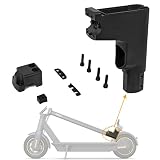
Felixstory Scooter Pressing Block, Dashboard Base Seat Bracket Handlebar Front Fork Stem Connector Bracket Compatible for Segway Ninebot MAX G30 G30P G30LP Electric Scooter Assembly Replacement Parts
Step-by-Step Guide to Unbinding Your Segway Ninebot Scooter(By using App)
Follow our step-by-step guide to ensure a smooth and successful unbinding procedure for your ninebot.
Step 1: Navigating the App
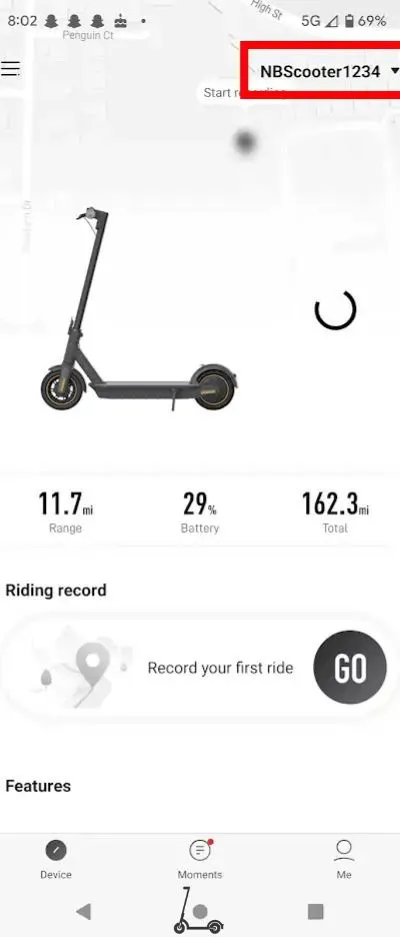
First, open up the Segway App. Make sure you're logged into the account that your Segway is currently connected to. This is your starting point for all things unbinding.
Step 2: Selecting Your Device
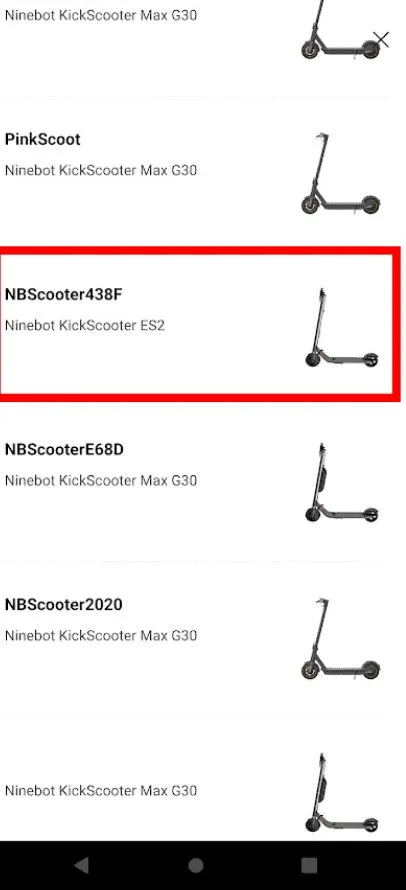
In the upper right corner of the app, locate the option to select your specific Segway Ninebot. If your device isn't currently selected, don't stress scroll through the list until you find it.
Step 3: Acknowledging the Advisory
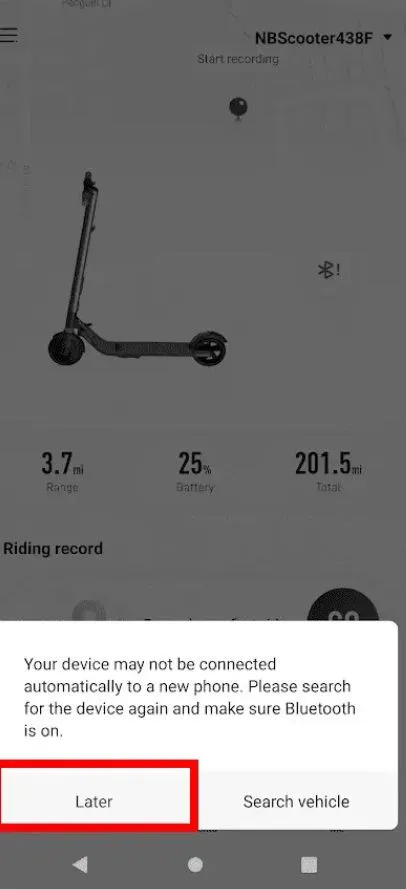
Occasionally, you might encounter a message that warns the device might not automatically connect to a new phone after unbinding. This is merely a heads-up and can be disregarded as you proceed with the unbinding process. Just tap on "Later".
Step 4: Accessing Settings
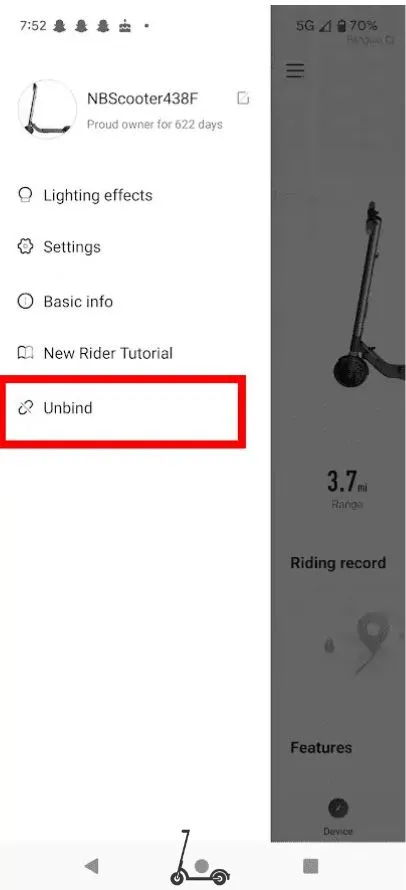
Tap the three horizontal bars in the upper left corner of the app to access the settings menu. Among the options listed, look for the "Unbind" option and give it a tap. This is where the magic happens.
Keep reading iENYRID Coupons.
Step 5: Verification Process
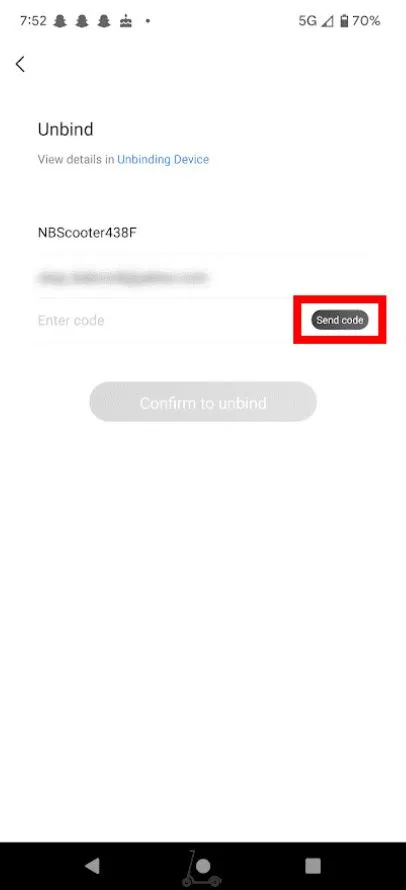
As part of the unbinding process, the app will prompt you to verify your action. A verification code will be sent to the email associated with your account. Click on "Send Code" and wait for the email to arrive. Once it's there, enter the code into the app.
These picks are top-rated replacements Ancheer Coupon Codes, and ATOMI Scooters Deals.
Step 6: Confirming Unbinding
Now, input the verification code and hit the "Confirm to Unbind" button. This step finalizes your intention to unbind your Segway Ninebot.
Congratulations! Your Segway Ninebot has been successfully unbound from the Segway E-Scooter App. The app will provide confirmation, marking the end of the unbinding process.
Unbinding Segway Ninebot Scooter (Without using App)
For situations where you don't have access to the Segway E-Scooter App, you can still unbind your Segway Ninebot without the app by following these steps:-
Unbind Using Power Button
- Find the power button on your scooter
- Hold down the power button for a certain duration (this may vary based on the model).
- Watch the indicator lights they will blink in a specific pattern.
- Eventually, the lights will show that the unbinding process is in progress.
- Release the power button to complete the process.
Unbind by Replacing Dashboard
Replacing dashboard of the scooter resets all the previous bindings of the scooter with bluetooth apps and Segway app. New dashboard is free to bind to any device other than the previous one which was binded. I mean if you are selling scooter but cannot unbind the device from your phone, replacing the dashboard to bind to the new owener is a good option..

Note: Replacing the dashboard will unbind the Segway scooter.
Tips and Considerations
If you're unbinding to sell or give away your Segway Ninebot, performing the unbinding process only when you're ready to hand over the scooter is better. This way, the device remains registered to your account until the transaction is finalized. Here's how to save on Segway Deals.
While unbinding is essential for transferring ownership, remember that you can always rebind the scooter with a new account if needed.
Conclusion
In conclusion, unbinding your Segway Ninebot is a straightforward process that grants you greater control over your electric scooter. Whether you prefer using the Segway app or following the app-free method, the key takeaway is that you have the power to manage your device as you see fit. By following the step-by-step instructions in this guide, you can confidently unbind your Ninebot, addressing any
ABOUT THE AUTHOR

Ken Marshall
Author
Ken “Magma” Marshall is currently the CSO and a Partner at RevenueZen, with 4 exits under his belt. He’s been obsessing over helping brands grow through sustainable SEO & content strategies for the last 8 years. Husband, coffee addict, recovering foodie, BJJ bro, and mini Australian shepherd puppy dad. Helping folks build their dreams is my passion.